
The main configuration in this article uses two Gunicorn synchronous workers, each writing one response at a time. We used a small Python application written without a framework to measure how a slow receiver affects responses to other requests.
A synchronous worker does not handle its next request until it finishes writing the current response. A worker is a program responsible for processing requests. What happens to another request when both workers cannot finish writing because the receivers read slowly?
In this configuration, two simultaneous slow downloads increased the response time of another endpoint from about 1.6ms to about 5.9 seconds. The metric is p95: the value that contains 95% of response times when they are sorted from shortest to longest. Representative values below are the median of the p95 values from three runs of each condition.
With just one download, the other endpoint's p95 was about 1.7ms. Adding NGINX between the application and receivers, and enabling it to read ahead and buffer responses, brought p95 to about 2.3ms with the same two synchronous workers. The download client's completion time was about eight seconds, as set by its read-rate control.
These results do not establish a property of all web applications or rank web frameworks. In a supplementary condition using the same application with four threads, p95 was about 1.5ms even without NGINX. We did not measure an asynchronous server.
First, the conditions we actually measured
| Item | Assumptions in this experiment |
|---|---|
| Application | A framework-free Python application using WSGI, an interface between applications and servers. No Flask, Django, FastAPI, or similar framework |
| Main server configuration | Gunicorn 23.0.0, two sync worker processes, each responding to one request at a time |
| Main comparison | The same application and workers, accessed directly or through NGINX with response buffering off or on |
| Large response | 16MiB of repeated data. The receiver reads at about 2MiB/s and uses pacing to complete in about eight seconds. Receive-buffer setting: 8KiB; Linux reports 16KiB |
| Other requests | Eight requests per second for nine seconds to an endpoint returning 12 bytes of JSON. A new TCP connection for every request |
| Network | HTTP/1.1 on the same Linux host. No TLS, compression, cache, or CDN. Neither a real Internet path nor a PaaS public serving path was measured |
| Supplementary condition | The same application under Gunicorn gthread, one process with four threads. Both execution model and concurrent request capacity change |
Response time for the other endpoint runs from the start of its TCP connection attempt to receipt of its 12-byte body. Each condition has three runs of 72 requests. CPU and memory were also capped for the experiment; the limits are listed in the configuration section at the end.
This experiment cannot tell us that another framework or an asynchronous server would slow down at the same request count, or that NGINX is always necessary. Below, we examine the differences in the main configuration in this table and the mechanisms that help explain them.
Run downloads alongside a response that is quick to produce
We provided two endpoints in the same application.
| Endpoint | Response | How it is received |
|---|---|---|
/large |
16MiB of data | Read at 2MiB per second, completing the paced download in about eight seconds |
/fast |
12 bytes of JSON | Read without an artificial delay; measure the time until the response arrives |
/fast is an API: an endpoint that a program calls to receive a result. We refer to these calls as the “other requests.” There are no database calls or heavy computations, so the response is quick to produce. MiB is a data-size unit: 1MiB is 1,048,576 bytes.
A client is the program that sends a request to a server and receives its response. A browser is one example. Here, experimental programs stand in for a person downloading data and another person making requests.
Gunicorn's sync workers handle one request at a time in the main configuration. The design documentation for the version used describes this behavior. Even with the same framework, the server's execution model and worker count affect how many requests can progress concurrently. We used a short application without framework-specific functionality to observe the server's behavior.
We varied the number of downloads between zero, one, and two, while sending /fast requests at eight per second for nine seconds. A slow response did not delay the next scheduled request, which was sent 125ms later. Each run measured 72 requests, and each condition was run three times.
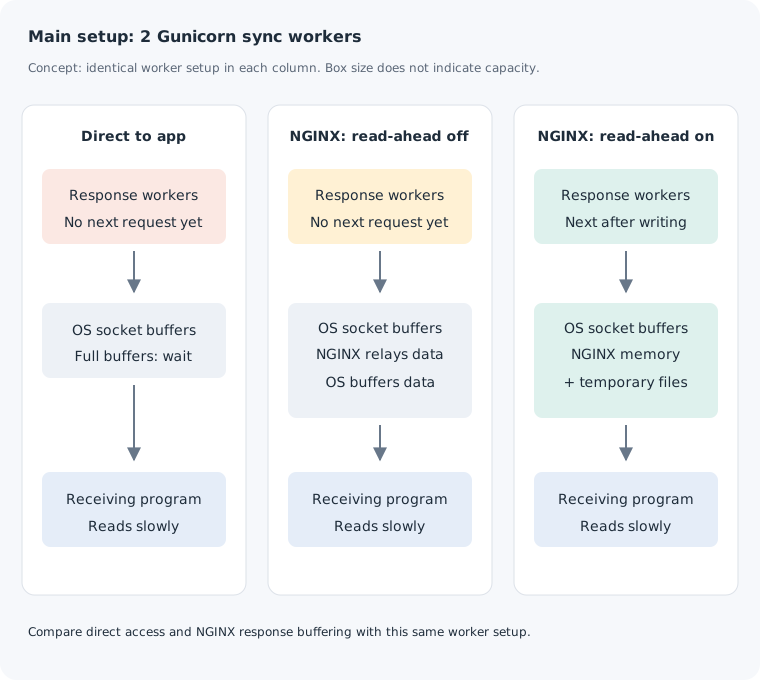
We also measured requests routed through NGINX. A server that forwards requests and responses between an application and its clients is acting as a reverse proxy.
NGINX can read the application's response ahead of its delivery to the client, storing data in memory or temporary files. This is response buffering. The tables and figures call this “read-ahead on/off.” Enabling it does not mean NGINX waits for the entire response to accumulate before sending anything to the client.
Two downloads occupied both response workers
All tables and figures in this section keep the two Gunicorn sync workers fixed. We show the p95 of the other requests—the value containing 95% of their response times—as the median of three runs. One millisecond is one thousandth of a second.
| Request path | No downloads | One download | Two downloads |
|---|---|---|---|
| Direct to app | 1.57 | 1.72 | 5,945.11 |
| NGINX: read-ahead off | 2.66 | 2.33 | 1,071.47 |
| NGINX: read-ahead on | 1.93 | 2.94 | 2.34 |
The unit is milliseconds. For example, 5,945ms is about 5.9 seconds.
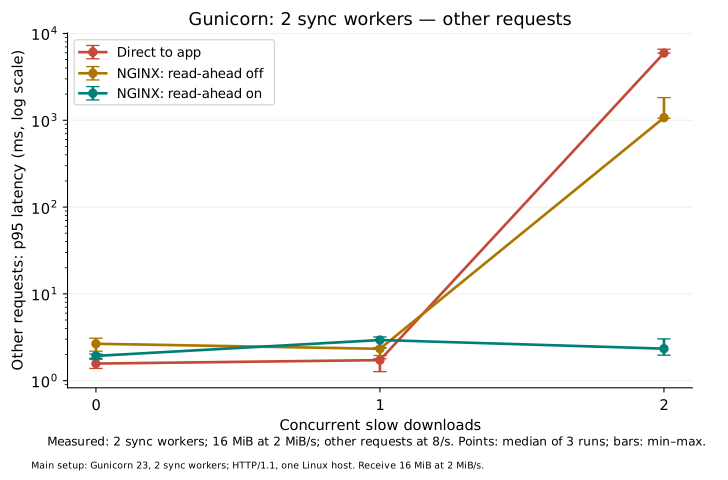
With direct access, one download left the other worker available for /fast. With two downloads, both workers were sending large responses, and /fast requests waited their turn.
The synchronous worker implementation provides a mechanism for understanding this. If receivers read slowly enough to fill the memory used for sending and receiving, a socket write waits for space to become available. A synchronous worker that cannot finish writing its response cannot advance to the next request.
Gunicorn's sync worker implementation writes response chunks in sequence. Its write implementation calls a socket, the interface a program uses to exchange data over a network. Until that write completes, the worker cannot move on to another request.
We observed the application's write duration and the other requests' response times. We did not measure the occupancy of each TCP buffer or inspect worker stacks to locate their waits. The observations are consistent with the behavior above, but do not establish how many bytes occupied each buffer.
Application CPU usage in these runs averaged at most about 0.8% of one core. Two workers can remain occupied by write waits even when there is computational capacity left.
Turning off NGINX read-ahead does not remove OS buffers
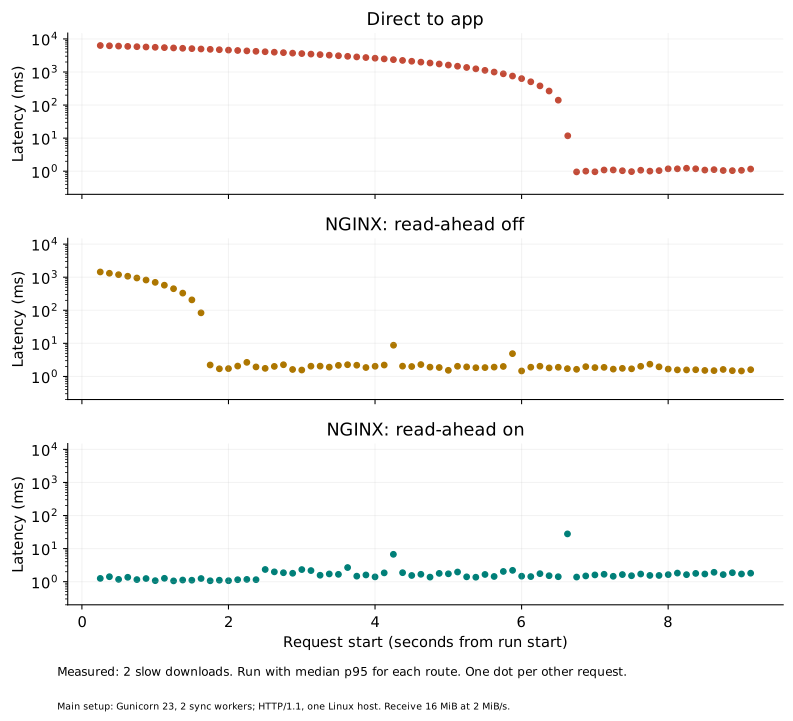
With NGINX read-ahead disabled and two downloads, p95 was about 1.1 seconds. This was shorter than direct access, but did not return to the roughly 2–3ms seen without downloads.
Before choosing the response size, we ran a pilot with 8MiB read at 1MiB/s. In that pilot, the other endpoint's p95 was about 2ms even with NGINX read-ahead disabled. We then changed the response to 16MiB and reading to 2MiB/s, keeping the paced download near eight seconds while increasing the data volume. Pilot values are not included in the tables.
Both response size and read rate changed between the pilot and main measurements. This does not isolate an effect of response size alone. The conclusions below apply to the main 16MiB, 2MiB/s condition.
The configuration that disables read-ahead is proxy_buffering off. OS send and receive memory still exists between the application and NGINX, and between NGINX and the receiving program. NGINX also uses a small buffer to read from the application. The NGINX documentation explains that proxy_buffer_size controls the maximum amount it can receive at a time even when buffering is off.
If the application can hand all response data to these buffers, it may move on to the next request before the receiver finishes. We did not measure individual socket occupancy, so these results do not define a universal boundary between 8MiB and 16MiB. The existence of buffering with read-ahead off follows from the specifications; we did not independently measure its capacity or contribution to the difference here.
Finishing a write is different from finishing a download
For the two-download condition, we measured two intervals separately.
- Application write duration: from the start of the response generator to handing the last response data to the OS send buffer.
- Client completion time: from sending the download request to receiving 16MiB and completing the pacing waits. This includes the rate-control wait after the final read.
| Request path | Application write (s) | Client completion (s) |
|---|---|---|
| Direct to app | 6.562 | 8.016 |
| NGINX: read-ahead off | 1.970 | 8.009 |
| NGINX: read-ahead on | 0.055 | 8.005 |
For each column, the table takes the median of the two responses in each run, then the median across the three runs.
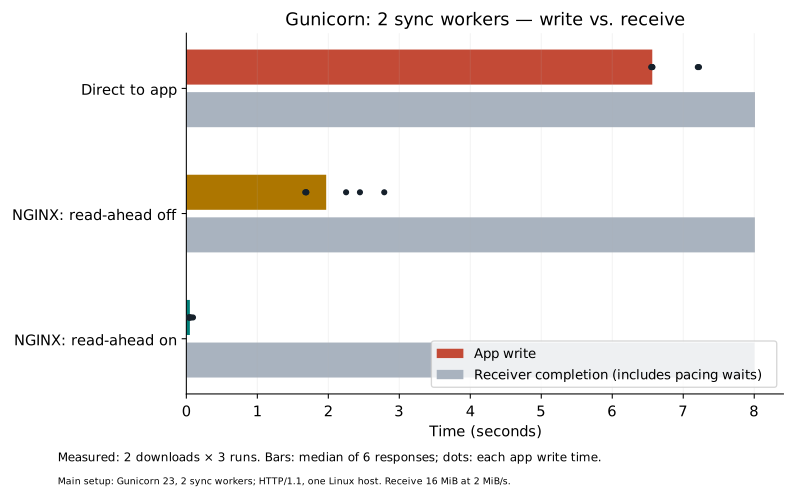
With read-ahead on, NGINX reads the application's response quickly. Data that does not fit in its memory buffers can also be saved to a temporary file. We observed behavior corresponding to this feature in the official NGINX specification.
In this configuration, the application can finish writing toward NGINX quickly and proceed to other requests. NGINX can continue sending to the receiver, separating application-write completion from client completion. The short API response times are consistent with this behavior. They do not show that enabling response buffering gives the same improvement in every application.
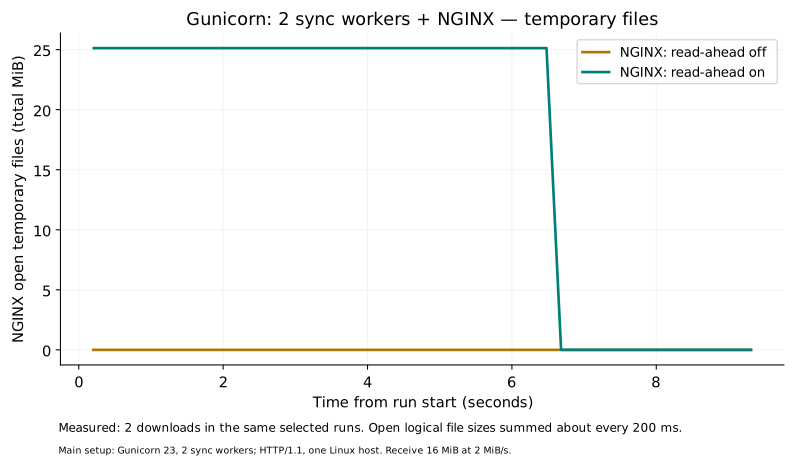
With read-ahead on, the total logical size of open temporary files for two downloads peaked at about 25.2MiB. Reducing the time application workers spend waiting on writes uses NGINX memory and files to store response data instead. File contents may also reside in OS memory, so saving data to a file does not eliminate memory consumption.
A supplementary configuration with more concurrent request capacity
For another check, we changed Gunicorn to gthread, one process with four threads. Threads let multiple activities progress within one process. This configuration provides four request-handling threads.
With direct access and two simultaneous downloads, the other endpoint's p95 was about 1.5ms. Two threads could be waiting on writes while others remained available for requests.
| Direct access with two downloads | Other requests' p95 (ms, median of three runs) |
|---|---|
| Main: two sync processes | 5,945.11 |
| Supplementary: one gthread process, four threads | 1.55 |
This supplementary condition changes both execution model and concurrent request capacity. It does not isolate either the model or capacity effect. It demonstrates that the same application can behave differently under another server configuration; it does not establish a performance advantage of threads or an optimal thread count.
What these measurements establish—and what they do not
In the main configuration, two concurrent slow receivers increased application write duration and the other endpoint's latency. Together with the Gunicorn sync specification, the fact that a worker cannot handle its next request until it finishes the current response helps interpret the result. The main comparison of NGINX response buffering was made with this worker configuration fixed.
We did not compare frameworks such as Flask, Django, or FastAPI, other servers or runtimes such as Uvicorn or Node.js, or asynchronous execution. These measurements cannot tell us that those environments would exhibit the same behavior or timings. The supplementary configuration also achieved about 1.5ms without NGINX, so NGINX is not established as a general requirement for web applications.
What to check in your own application
First, separate the time spent producing response data from the time spent writing it. If producing the data is quick but writing takes a long time, investigate client reads and the sending and receiving along the path.
Next, check whether a worker waiting on a write can handle another request. For a one-request-at-a-time configuration such as the sync workers used here, examine both the number of write waits and the worker count.
If a PaaS or another hosting setup places a proxy in front of the application, check how far that proxy reads responses ahead of client delivery. After changing a setting, compare the other requests' latency along with proxy memory and temporary-file usage.
Enabling read-ahead may also affect when data arrives for responses intended to deliver small updates immediately. This experiment covers ordinary HTTP responses with a known size. SSE, which can display text incrementally, and WebSockets, which keep a connection for bidirectional communication, need separate checks.
Before applying these results, check the server execution model, worker or thread count, and proxy settings in your application. Do not infer behavior from the framework's name alone. The practical takeaway is to determine whether other requests can progress while a response waits to be written.
Versions, configuration, and measurement method
Runtime and read rate
Gunicorn 23.0.0, NGINX 1.22.1 (Debian package 1.22.1-9+deb12u10), CPython 3.11.2, Linux 6.12, and aarch64. The large response repeats one preallocated 64KiB block 256 times, totaling 16MiB.
All traffic uses 127.0.0.1 on the same host (loopback), with HTTP/1.1 and connections closed after each response. No TLS encryption, compression, or cache is used. Client read intervals implement approximately 2MiB/s. This does not slow a real Internet link.
The receiving socket's SO_RCVBUF setting is 8KiB; Linux reports 16KiB. As described by the Linux socket documentation, that value includes bookkeeping space and is not the actual TCP receive window. The asyncio StreamReader limit is 16KiB. /fast requests start about 250ms after download connections start.
NGINX settings and temporary-file measurement
“Read-ahead on/off” corresponds to proxy_buffering on / off. Other settings are identical: proxy_buffer_size 16k, proxy_buffers 4 16k, proxy_busy_buffers_size 32k, proxy_max_temp_file_size 32m, and proxy_temp_file_write_size 64k. The 32MiB temporary-file limit applies per request.
A process may keep using a file after its name has been removed. We therefore inspected files NGINX had open through /proc/PID/fd, rather than relying on a directory listing. Device and inode numbers identify files and prevent double counting. See the Linux file-descriptor documentation.
Aggregation and variation
Within each run, we sorted 72 response times and used the 69th value, rounding the 95% rank upward, as p95. Condition tables use the median of those three p95 values. For two downloads, their ranges were:
| Request path | Range of three run-level p95 values (ms) |
|---|---|
| Direct to app | 5,928.68–6,590.04 |
| NGINX: read-ahead off | 1,052.72–1,826.44 |
| NGINX: read-ahead on | 1.96–3.03 |
There were 30 main-measurement runs. All 2,160 /fast requests returned HTTP 200, and all 33 large responses delivered 16MiB. The maximum delay from a request's scheduled start to its actual start was about 7.0ms.
CPU caps were 0.25 core for the application, 0.20 for NGINX, and 0.20 for the controller/load generator, with a 10ms quota period. Their memory limits were 128MiB, 96MiB, and 128MiB. CPU time, throttling, and memory usage were recorded. A host-wide CPU safety threshold stopped the main stage once; the unfinished run was excluded, the 17 completed runs retained, and only the remaining 13 were resumed. Safety thresholds and application conditions were unchanged.
This is not a measurement of maximum throughput or long-duration resilience. Individual TCP-buffer occupancy, HTTP/2, HTTP/3, SSE, WebSockets, slow uploads, large connection counts, and memory or disk exhaustion were not tested.
Measurements are available as condition summaries, individual-run summaries, per-request response times, large-response write and completion times, and resource time series. The data README explains aggregation and the reproduction code.
KamuiDash is a PaaS for deploying web applications from GitHub.