
Connect your Node.js app's GitHub repository to a hosting provider so a push can trigger a deployment. This guide uses KamuiDash to show how to configure a branch, working directory and start command, then verify the result on a public URL.
In this article
What happens after a push?
The hosting provider watches the connected branch, prepares the app and starts the new deployment. KamuiDash's GitHub integration can handle this without a custom GitHub Actions workflow. Grant repository access and configure the hosting service first.
Make a small Node.js app
Download the sample and put its contents at the repository root. It uses the built-in HTTP module and has no database or external packages.
{
  "name": "small-node-deploy-example",
  "version": "1.0.0",
  "private": true,
  "type": "module",
  "scripts": { "start": "node server.js" },
  "engines": { "node": ">=22" }
}
import http from 'node:http';

const port = Number(process.env.PORT || 3000);
const server = http.createServer((req, res) => {
  const path = new URL(req.url, 'http://localhost').pathname;
  if (req.method !== 'GET') {
    res.writeHead(405, { 'content-type': 'application/json', allow: 'GET' });
    res.end(JSON.stringify({ error: 'Method not allowed' }));
    return;
  }
  res.setHeader('content-type', 'application/json; charset=utf-8');
  if (path === '/healthz') res.end(JSON.stringify({ ok: true }));
  else if (path === '/') res.end(JSON.stringify({ message: 'Hello from Node.js', version: 'v1' }));
  else { res.statusCode = 404; res.end(JSON.stringify({ error: 'Not found' })); }
});
server.listen(port, '0.0.0.0', () => console.log(`Listening on ${port}`));
process.on('SIGTERM', () => {
  server.close(() => process.exit(0));
  setTimeout(() => process.exit(1), 10000).unref();
});
The server listens on the supplied PORT at 0.0.0.0. The root returns a message and version. The health endpoint returns JSON. On SIGTERM, the server stops accepting new connections and closes.
Install Node.js 22 or later and npm before running the sample. The dependency-free app lets you check repository access and runtime configuration before adding a database. Store persistent data outside the process.
npm ci
PORT=3000 npm run start
From another terminal, confirm both routes return HTTP 200 and that the root reports v1.
curl --fail http://127.0.0.1:3000/
curl --fail http://127.0.0.1:3000/healthz
Push the sample to GitHub
Create an empty repository without initializing a README. Use your own repository URL and authenticate to GitHub. If your project is already under Git, check its current branch and remote before adding a new one. Commit the lockfile and keep secrets such as .env files out of Git. GitHub guide to adding local code
git init
git branch -M main
git add package.json package-lock.json server.js .gitignore
git commit -m "Add small HTTP app"
git remote add origin https://github.com/YOUR_ACCOUNT/YOUR_REPOSITORY.git
git push -u origin main
Configure the service on KamuiDash
Create a Node.js web server in your project. If the repository is missing, check the GitHub App's account and repository access. GitHub App installation guide
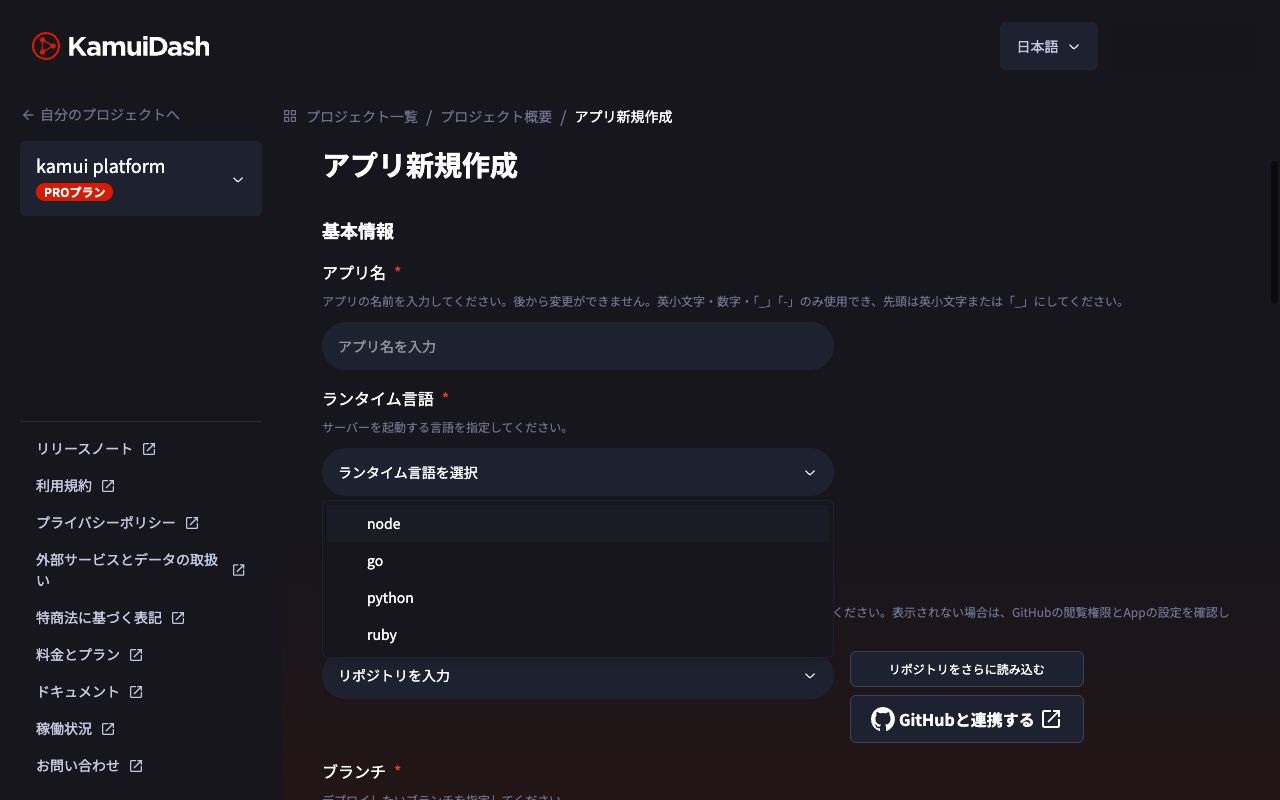
| Setting | Value |
|---|---|
| Runtime | Web server / Node.js |
| Repository and branch | The sample repository, main |
| Root directory | Leave blank when package.json is at the repository root |
| Setup | npm ci |
| Pre-start | Leave blank |
| Start | npm run start |
| Health check | /healthz |
For an app under apps/api, set that as the root directory so the commands run where package.json lives. Add any build step your app needs to setup. KamuiDash Node.js settings
Check the first deployment
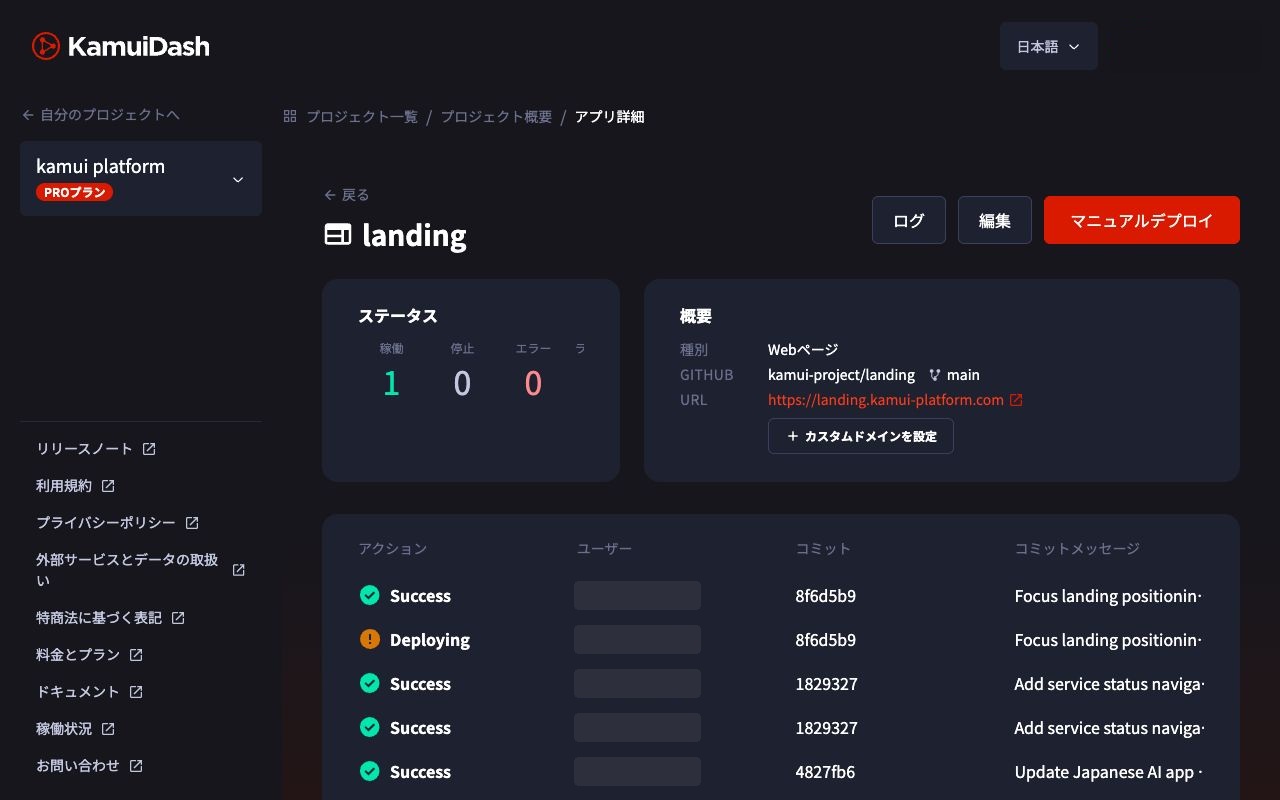
Wait for the deployment, then open / and /healthz on the issued HTTPS URL. Check that the root returns v1. For a real app, also check the pages and APIs users rely on.
Push a change and verify the new version
Change the version in server.js from v1 to v2 and push.
git add server.js
git commit -m "Change response version to v2"
git push origin main
Find the commit in KamuiDash deployment history. Once it succeeds, fetch the public URL and check that the JSON reports v2.
| Symptom | First check |
|---|---|
| GitHub does not show the change | Remote, branch and commit |
| Deployment does not start | Connected branch and GitHub App access |
| Build fails | Setup logs, lockfile and working directory |
| Startup fails | Startup logs, PORT and bind address |
| Old response after success | Deployed commit, URL and cache |
Frequently asked questions
Do I need GitHub Actions?
KamuiDash's GitHub integration can build and deploy without a custom workflow. Configure tests and branch protection separately if changes should pass checks before release.
Does a push to main go live immediately?
The connected branch triggers a deployment. Setup and startup take time and can fail, so check the deployed commit and public response before sharing it. For team projects, protect the production branch and merge reviewed changes.
Can I add a database?
Yes. Plan database configuration, migrations and persistence checks. FastAPI and PostgreSQL deployment guide
How much does it cost?
Eligible apps and databases have a 30-day trial for base fees. The personal Nano web server starts at $3 before tax per replica per 30 days. Check usage and add-on charges separately. Hosting cost guide
Start by checking the failed stage and its first concrete error. Once v1 and v2 work, you can add a build step or database while retaining a known deployment path.
Verification scope: the sample was started and its HTTP responses were checked locally. The GitHub push and a new KamuiDash deployment were outside that test. Configuration checked November 2, 2026.
KamuiDash is a Tokyo-region PaaS for publishing web applications through GitHub and AI integrations.